You plug in your iPhone before bed, and in the morning it’s still at 12%. Or the charging icon flickers on and off, or nothing happens at all. It’s frustrating, but in most cases the fix is quick and free.
Quick answer: Most iPhones that won’t charge have a dirty charging port, a damaged cable or a weak power adapter. Start with the free fixes below. If none of them work, the charging port or battery likely needs a repair.
What’s stopping your iPhone from charging?
Charging depends on five things working together. Here’s how to tell which one is the problem:
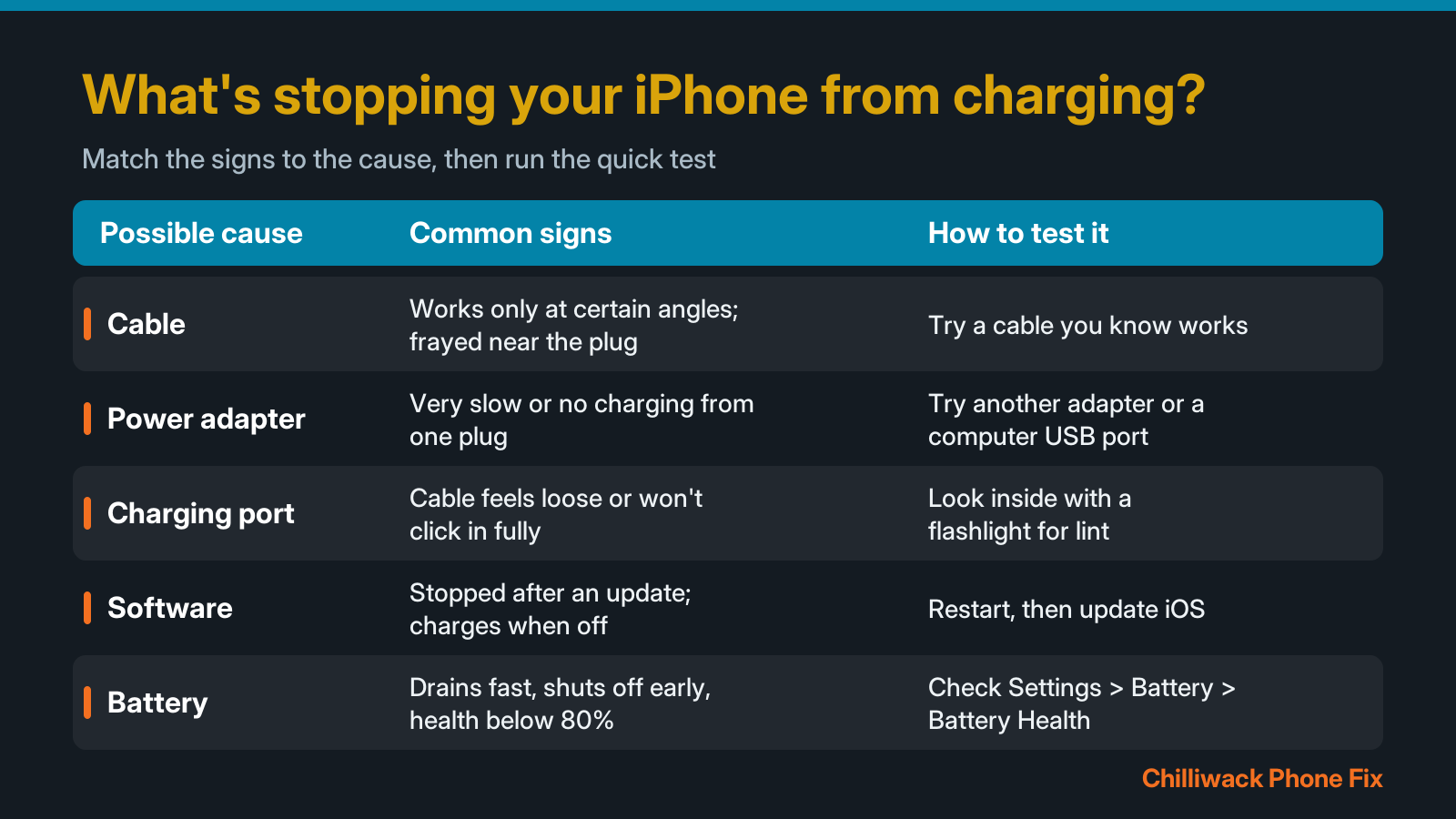
Work through the fixes in order. Each one rules out a cause, starting with the most common.
8 fixes to try when your iPhone won’t charge
1. Clean the charging port
Pocket lint is the number one reason an iPhone stops charging. It packs into the bottom of the port, so the cable can’t seat fully.
• Turn the iPhone off and shine a flashlight into the port.
• Gently scrape out lint with a wooden toothpick or plastic flosser.
• Never use metal (pins, paper clips) or liquids, and don’t blow into the port. Moisture from your breath can cause corrosion.
If the cable now clicks in firmly, you’ve likely found the problem.
2. Try a different cable
Lightning and USB-C cables wear out, especially near the plug. Swap in a cable you know works. Use an Apple cable or one marked MFi certified (Made for iPhone), since cheap cables can stop working after iOS updates.
3. Try a different power adapter or outlet
Plug into another wall outlet, a different adapter or a computer’s USB port. If it charges from one source but not another, replace the adapter.
4. Force restart your iPhone
A frozen background process can stop charging. A force restart doesn’t delete anything.
• iPhone 8 and newer: press and release Volume Up, press and release Volume Down, then hold the Side button until the Apple logo appears.
Plug it back in and wait a few minutes.
5. Let it charge for 30 minutes
A completely drained battery may show a black screen or a red battery icon at first. Leave it plugged in for at least 30 minutes before deciding it’s not charging.
6. Update iOS
Charging bugs are sometimes fixed in updates. Go to Settings > General > Software Update and install any available update while connected to Wi-Fi.
7. Check for “Optimized Charging” or the 80% limit
If your iPhone stops at 80%, it may not be broken. Optimized Battery Charging pauses at 80% overnight, and iPhone 15 and newer can be set to stop at 80% to protect the battery. Check Settings > Battery > Charging.
8. Check your battery health
Go to Settings > Battery > Battery Health. If Maximum Capacity is below 80% or it says “Service,” the battery may not hold a charge properly anymore. A battery replacement usually fixes this.
Messages and situations most guides skip
iPhone charges wirelessly but not with a cable
If MagSafe or a wireless pad works but the cable doesn’t, the battery is fine. The problem is the cable, adapter or charging port. Clean the port first (fix 1); if that doesn’t help, the port itself is likely worn or damaged.
iPhone charges with a cable but not wirelessly
Remove thick cases, metal plates or cards from the back of the phone, and center it on the charger. If it still won’t charge, check the charger with another phone. A cracked back glass can also stop wireless charging.
“Liquid Detected in Lightning/USB-C Connector”
Your iPhone found moisture in the port and paused charging to prevent damage. Unplug it, tap the phone gently against your hand with the port facing down, and leave it in a dry place for at least 30 minutes. Don’t put it in rice, and don’t use a hair dryer. If the alert keeps coming back when the phone is dry, the port may have corrosion.
“Charging On Hold” or “Charging Paused”
This means the iPhone is too hot. Move it out of the sun, take off the case and let it cool down. Charging resumes on its own.
“This accessory may not be supported”
This usually points to a damaged or uncertified cable, or debris in the port. Try a different Apple or MFi-certified cable and clean the port.
When it’s time for a repair
If you’ve tried all eight fixes and your iPhone still won’t charge, home fixes won’t solve it. These signs point to a hardware problem:
• The cable is loose or falls out even after cleaning the port
• You see corrosion (green or white residue) inside the port
• It charges only when you hold the cable at an angle
• The phone was dropped or got wet before the problem started
• Battery Health is below 80% and the battery drains quickly
An iPhone charging port repair in Chilliwack is usually quick and much cheaper than a new phone. A technician can also test whether the port, battery or charging chip is at fault, so you only pay for the repair you need.
Getting your iPhone charging again in Chilliwack
If the fixes above didn’t work, bring your phone in for a professional check. Here’s what happens:
1. Free charging check. We test the cable, port, battery and charging circuit to find the real cause.
2. Port cleaning first. If it’s just packed lint, we clean it safely, and you may not need a repair at all.
3. Clear quote. If a part needs replacing, you know the price before any work begins.
4. Repair and test. Most charging port repairs are done the same day, and we test charging before handing your phone back.
You’ll find us at our Yale Road store, by Midtown Apartments at Yale Road and Airport Road. We repair charging ports, batteries, screens and back glass on every iPhone model.
Frequently Asked Questions
What causes an iPhone to suddenly stop charging?
The most common causes are lint packed into the charging port, a damaged cable or a faulty power adapter. Software glitches, moisture in the port and a worn battery can also stop charging suddenly.
How do I force my iPhone to charge?
Force restart it (Volume Up, Volume Down, then hold the Side button), clean the port and connect it to a known-good cable and wall adapter for at least 30 minutes. If it still won’t charge, the port or battery likely needs a repair.
Why is my phone not charging even though the charger works?
If the charger works on another phone, the problem is in your iPhone: usually a dirty or damaged charging port, or a worn battery. Cleaning the port fixes it in many cases; otherwise, a technician can test the port and battery.
iPhone still not charging?
Don’t wait until your battery hits zero. Call us at 778-201-9242 or visit our Yale Road store for a free charging check. We’ll find the cause and tell you exactly what your iPhone needs before any work begins.