
One slip off the counter and your Galaxy has a spiderweb across the glass. Before you book anything, it helps to know what a Samsung screen replacement actually involves, what Samsung itself charges, and which mistakes cost people the most. This guide covers the Galaxy S23, S24 and S25 series, with Samsung Canada’s official prices and the steps to take before you hand your phone over.
The quick answer
Samsung Canada’s suggested price to repair a cracked screen on a Galaxy S23, S24 or S25 is $229 to $439, before tax. The Ultra models cost the most, and the FE models cost the least. The one exception is the Galaxy S25 Edge, which only gets a full screen module replacement at $388.
Samsung’s screen repair prices, S23 to S25
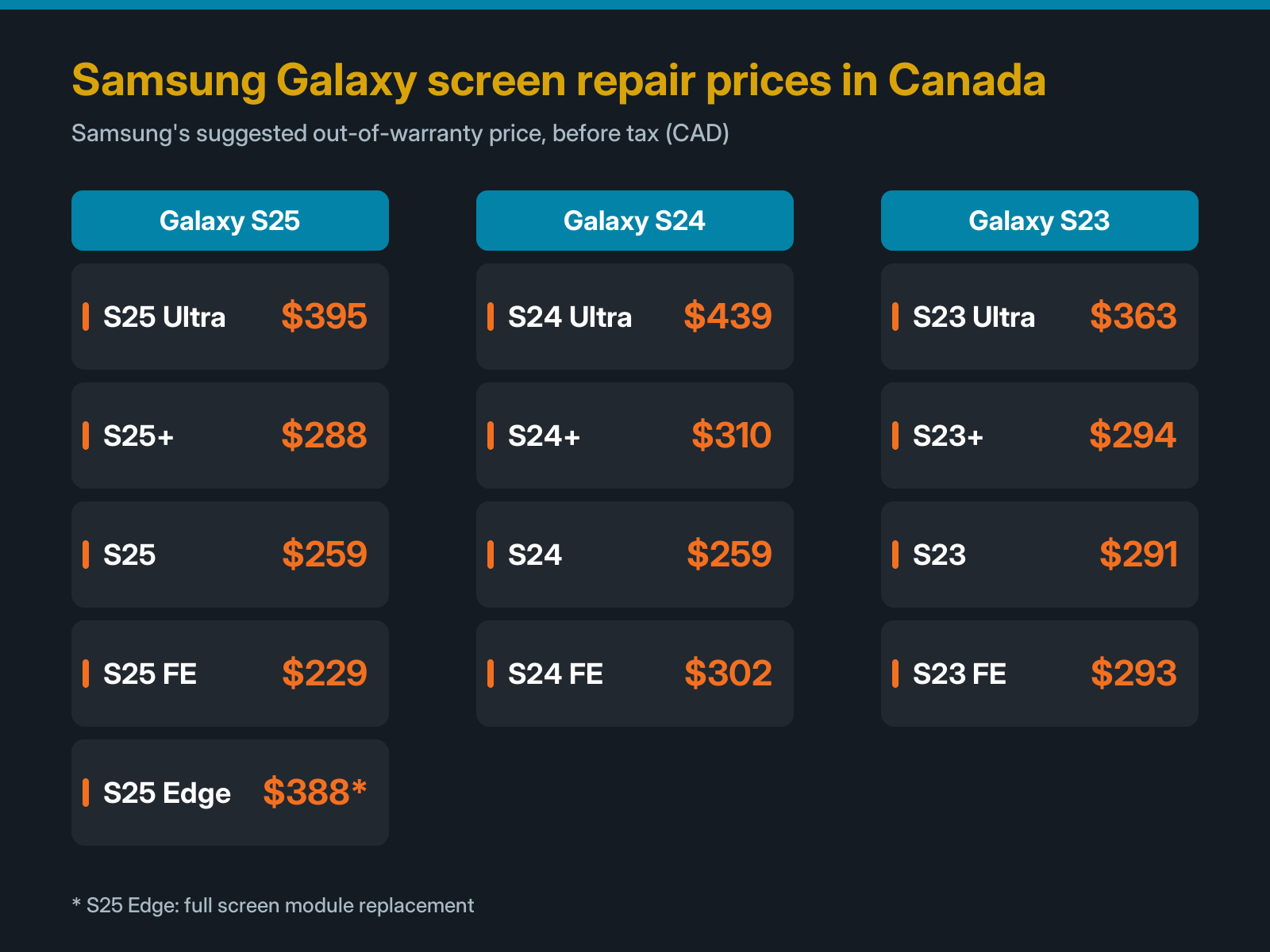
Samsung Canada’s suggested out-of-warranty prices in Canadian dollars, before tax, from Samsung’s repair cost page in November 2026.
Why prices don’t follow the model year
You might expect an older phone to be cheaper to fix. It isn’t always. The Galaxy S24 Ultra ($439) costs more than the newer S25 Ultra ($395), and the S23 costs more than the S24 or S25. Samsung prices each model on its own parts cost, so always check your exact model.
The Ultra models sit at the top for a reason. They have the largest, sharpest displays in the range, and their screens work with the S Pen, so the part itself is more expensive.
Screen repair vs screen module: what’s the difference?
Samsung Canada offers two kinds of screen fix, and they’re not the same job:
- Screen repair replaces only the broken parts of the display. It’s the cheaper option and creates less waste.
- Screen module replacement swaps the whole front assembly: the screen, the frame around it (the bezel) and the battery.
For most of the S23, S24 and S25 range, Samsung lists screen repair only. The S25 Edge is the exception: Samsung lists only a full module replacement for it. If your frame is bent from the drop, a module replacement may be needed on other models too.
What the price doesn’t include
The number on Samsung’s page isn’t always what you pay at the end.
- Tax. In BC, 5% GST and 7% PST are added. A $395 repair comes to about $442.
- A cracked back too. If the drop cracked the back glass as well, that’s a separate repair. On the S23 to S25, Samsung lists the back cover at $156 to $198.
- A bent frame or water damage. Either one can turn a simple screen repair into a bigger job.
- A tired battery. If your S23 is already draining fast, ask about the battery at the same time. It’s $202 to $231 on its own for the S23 series.
Genuine vs cheap screens
Not every replacement screen is equal, and on a Galaxy the difference matters more than on most phones.
- Genuine Samsung AMOLED screens match the original colour, brightness and touch. Samsung uses only genuine parts in its own repairs.
- Cheap aftermarket screens (often sold as “incell” or “TFT”) use a different, thicker panel. Colours look washed out, they can drain the battery faster, and the in-screen fingerprint reader often stops working.
That fingerprint reader is the big one. The S23, S24 and S25 read your fingerprint through the display, so a low-quality screen can leave you typing your PIN for every unlock. Before you agree to any repair, ask which type of screen will be used. Experienced android screen repair services chilliwack will tell you upfront and test the fingerprint reader before you leave.
Before you hand your phone over
- Back it up. Use Samsung Cloud, Google or Smart Switch. Samsung warns that a phone may be factory reset during repair.
- Turn on Maintenance mode. Go to Settings > Battery and device care > Maintenance mode. It hides your photos, messages and accounts from the technician while still letting them test the phone. Turn it off when you get it back.
- Remove your SIM, memory card and case.
- Take photos of the damage, front and back.
After the repair
- Re-register your fingerprint. A new screen usually needs it. Go to Settings > Security and privacy > Biometrics > Fingerprints.
- Test the touch in every corner, the brightness and the auto-rotate.
- Add a new screen protector. Some protectors stop the fingerprint reader from working, so pick one made for your model.
Samsung Care+ vs paying out of pocket
With Samsung Care+, a cracked screen costs a much smaller service fee than the prices above. But you have to buy it within 60 days of buying your phone (30 days in Quebec), so it only helps if you planned ahead.
Is it worth fixing?
- Galaxy S24 and S25: almost always. Samsung promises seven years of Android and security updates on these phones.
- Galaxy S23: usually, if the battery is healthy and nothing else is damaged. It still has years of security updates left.
- Cracked screen plus a bent frame or water damage: get a proper quote first. The total may be closer to the price of a newer phone.
If you’re not sure how bad it is, a quick check for cracked screen repair chilliwack will tell you whether it’s just the glass or something more.
Get your Galaxy screen checked in Chilliwack
Not sure if your screen needs a repair or a full module? Bring it to Chilliwack Phone Fix, offering samsung repair services in chilliwack at Southgate Mall, or call 604-991-3699. We’ll check the screen, frame and fingerprint reader and explain your options before any work begins.
A cracked screen only spreads. Fix it before the glass splinters or the touch stops working.
Frequently asked questions
How much does a Samsung screen replacement cost in Canada?
Samsung Canada’s suggested price for a cracked screen on the Galaxy S23, S24 and S25 is $229 to $439 before tax, depending on the model. The Ultra models cost the most. The Galaxy S25 Edge gets a full screen module replacement at $388.
Will my fingerprint sensor work after a screen replacement?
With a genuine Samsung screen, yes. You’ll just need to register your fingerprint again. Cheap aftermarket screens often stop the in-display fingerprint reader from working, so ask which screen is being used before the repair.
Will I lose my data when my Samsung screen is replaced?
A screen repair doesn’t normally erase your data, but Samsung warns a phone may be factory reset during repair. Back up to Samsung Cloud, Google or Smart Switch first, and turn on Maintenance mode to keep your personal data private.
Cracked Galaxy screen?
Get your Samsung looking and working like new again. Call 604-991-3699 or visit our Southgate Mall store for a free screen check before any work begins.